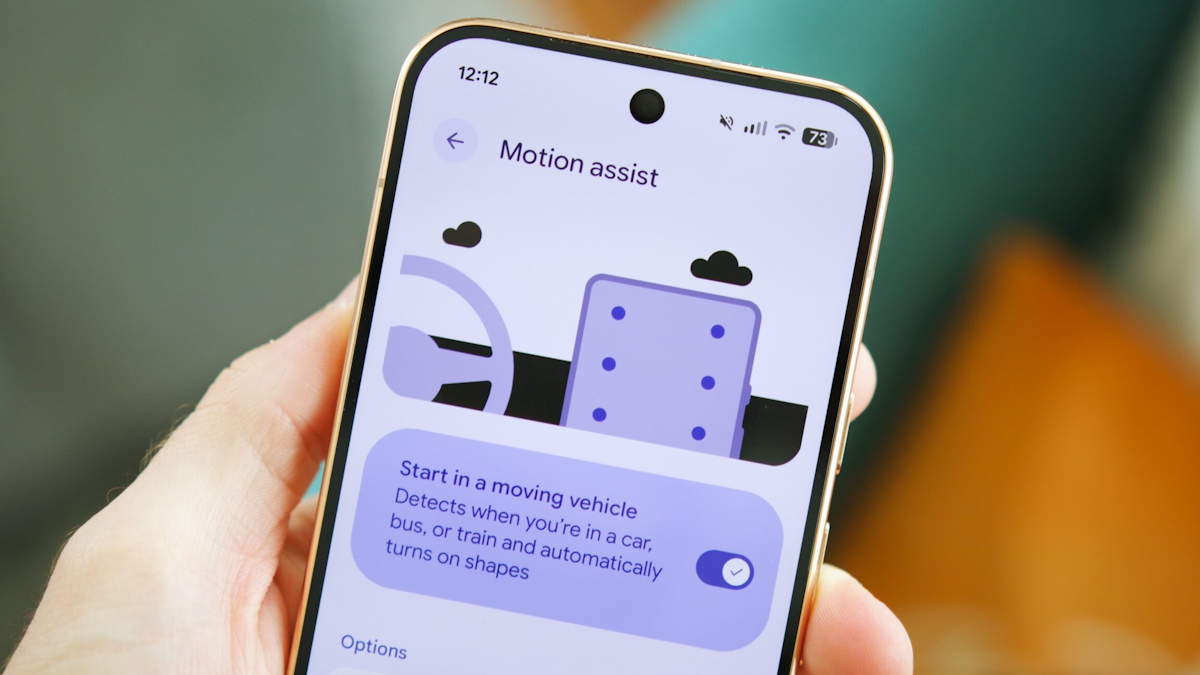
Android phones get a feature that reduces motion sickness when using the cell phone in the car
Function arrives at Pixel and Galaxy through Google Play Services and displays shapes on the edges of the screen that react to curves, braking and acceleration
Google released Motion Assist to reduce motion sickness for people with motion sickness when using their cell phones during vehicle trips (Photo: PPLWare | Reproduction)
Google has released Motion Assist for Pixel and Samsung Galaxy phones with Android 17, a feature that uses graphic elements on the edges of the screen to reduce motion sickness for those who read or play on their cell phones inside a moving vehicle. The function relies on the device’s sensors and responds in real time to acceleration, braking and turning.
The tool was developed for those who suffer from motion sickness, the discomfort caused by the mismatch between what the eyes see and what the inner ear registers. The official support page is explicit about the public: the feature is indicated for passengers, not for those behind the wheel.
Photo: Internet | Reproduction
Bubbles that follow the curve
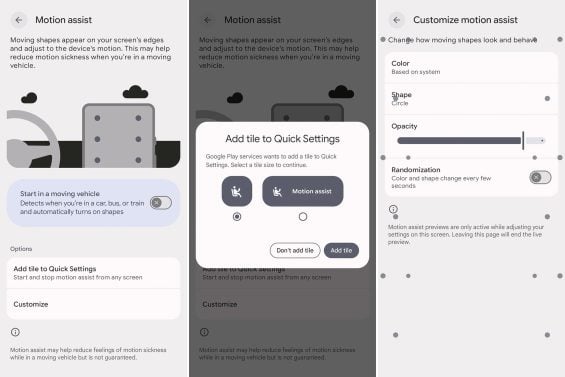
With Motion Assist on, the screen displays two columns of small shapes on the sides. Gyroscope and accelerometer feed the animation, which slides to the opposite side of the car’s movement. The idea is to offer a constant peripheral visual reference, aligning the information captured by the eyes with the physical sensation of the body and reducing the sensory conflict that generates nausea.
The user can choose the shape of the elements between circle, square, pentagon and rhombus, as well as adjust the opacity and set the color between dynamic, red, yellow, green and blue. There is also the option to automatically switch shape and color every few seconds.
Google warns, in a note on the feature’s page, that a small portion of users may notice worsening symptoms with the feature activated.
Where to find the function
To activate it, the way is to go to Settings, Google, All services tab, Personal and Device Safety, and then Motion Assist. The menu also allows you to turn on automatic activation when it detects that the device is in a vehicle, and Google recommends adding a shortcut to Quick Settings to turn on and off from any screen. A silent notification disables the feature with a tap.
The distribution takes place gradually through Google Play Services, starting with version 26.33.32, without depending on a firmware update. On Samsung devices, Android 17 corresponds to One UI 9, which debuted with the Galaxy Z Fold 8 and Z Flip 8 and continues to advance by scaling up to older models. Those who do not find the function should restart the phone, according to the company’s recommendation.
The advance was announced on X by Mishaal Rahman, responsible for engagement with the Android community at Google and, until January of this year, one of the best-known journalists covering the system. Apple has offered an equivalent function since September 2024, with Vehicle Motion Cues, introduced in iOS 18.
Comments are the sole responsibility of their authors and do not represent the opinion of this site. Comments containing profanity or offensive language will not be published. If you identify anything that violates the terms of use, please report it.